CT Region System is a free RPG Maker MZ plugin that automatically runs map events when the player enters a painted Region ID. It helps RPG Maker developers create area-based weather, music, traps, animations and story triggers without setting up Autorun or Parallel Process events, variables or common events.
WHAT DOES CT REGION SYSTEM DO?
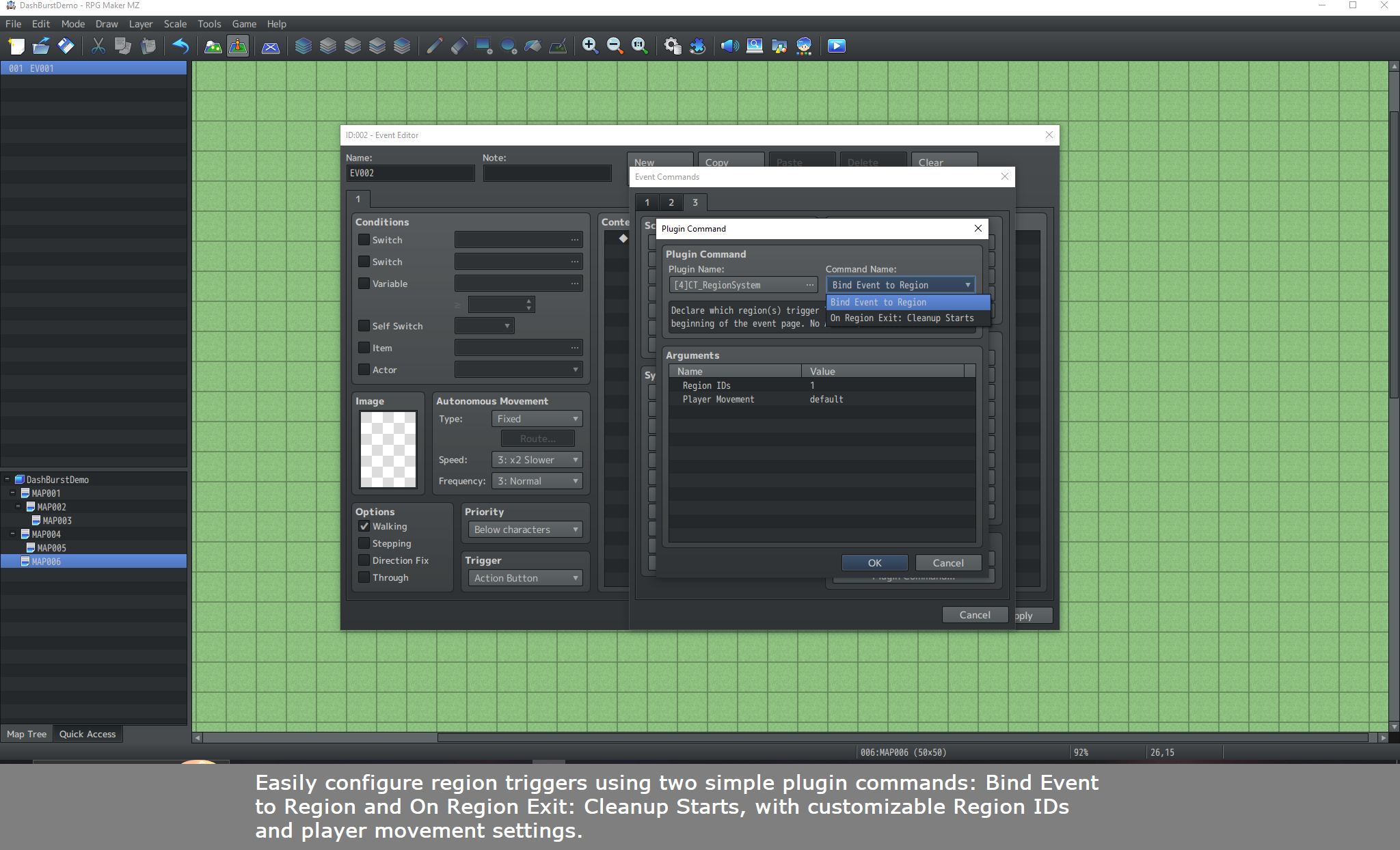
Paint a Region ID from 1 to 255 in RPG Maker MZ, then use the Bind Event to Region plugin command on an ordinary map event. When the player enters that region, the plugin starts its bound event commands. Multiple events assigned to the same region run one after another in ascending map Event ID order.
KEY FEATURES
• Region-entry triggers: Run map event commands when the player enters a painted region (IDs 1–255).
• Multiple events per region: Run bound events sequentially, lowest Event ID first.
• Flexible bindings: Bind one event to several IDs using values such as 1,2,5-8.
• Smart cancellation: Leaving a region stops its unfinished entry sequence and skips events that have not started.
• Optional exit cleanup: Use On Region Exit: Cleanup Starts to run cleanup commands for events whose entry section actually started. You can stop audio, clear weather or reset switches by adding those commands yourself.
• Player movement options: Choose Allow Movement, Block Movement or Use Region Default while entry events run. RPG Maker's normal message, choice and battle restrictions still apply.
• No repeated entry trigger within a region: Walking from one tile to another with the same Region ID does not restart the sequence.
• Lightweight execution: Uses a central dispatcher rather than a separate parallel polling event for each region.
HOW TO USE CT REGION SYSTEM
- Install [4]CT_RegionSystem.js in your project's js/plugins folder and enable it in RPG Maker MZ's Plugin Manager.
- Select the Regions (R) layer on your map and paint Region ID 1 (or another ID from 1 to 255).
- Create a normal map event on the same map. An Action Button trigger and Below Characters priority are suitable starting settings.
- As the first event command, choose Plugin Command > [4]CT_RegionSystem > Bind Event to Region. Set Region IDs to 1 and select the player movement option.
- Add ordinary event commands underneath, such as Set Weather Effect, Play BGM, Show Animation, Wait or Change HP.
- Optional: After the entry commands, insert On Region Exit: Cleanup Starts and place your cleanup commands below it.
- Save and playtest. Enter the painted region to activate the event sequence; leave it to cancel unfinished entry work and run applicable cleanup commands.
EXAMPLE: RAIN ZONE
Bind Event to Region (Region IDs: 1, Player Movement: Allow)
Set Weather Effect: Rain
Play BGM: Battle2
On Region Exit: Cleanup Starts
Set Weather Effect: None
Play BGM: None
USE CASES
• Area-specific rain, fog or other weather changes
• Environmental background music and sound transitions
• Trap zones and hazardous locations
• Exploration, cutscene and story triggers
• Character animations and region-based gameplay effects
IMPORTANT BEHAVIOR
• Region ID 0 is unpainted space and cannot be bound.
• Bindings apply to currently active event pages on the same map.
• A started event can run its cleanup after leaving the region, but the plugin cannot automatically undo changes made by event commands; configure those reversals yourself.
• Ordinary map transfers discard pending map-specific entry and cleanup work.
• If a game is loaded during an entry sequence, the region starts afresh; the running interpreter is not saved.
• Test compatibility with other plugins that alter player movement or the event interpreter.
PLUGIN DETAILS
Plugin: CT Region System
Version: 1.0.0
Developer: Cynthia Tools
Engine: RPG Maker MZ
Price: Free (name your own price on itch.io)
Required plugins: None
Download: https://cynthiatool.itch.io/free-rpg-maker-mz-plugin-ct-region-system
Looking for a free RPG Maker MZ region trigger plugin, a map event automation plugin, or a way to run events when entering and leaving map areas? CT Region System provides Region ID bindings, predictable execution order and optional exit cleanup using ordinary RPG Maker MZ event commands.