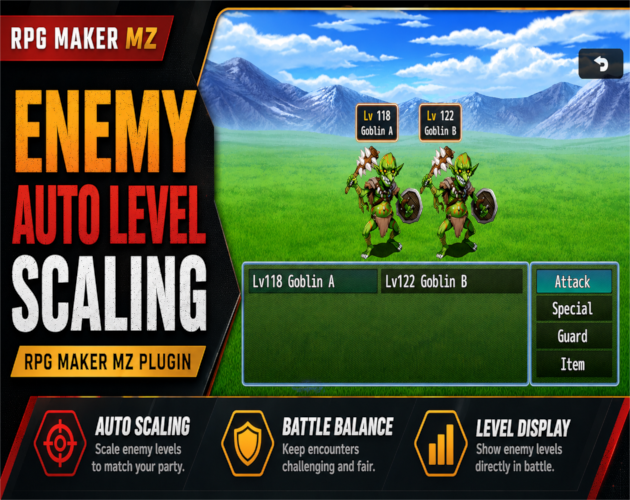
CT Enemy Auto Level Scaling is an RPG Maker MZ enemy scaling plugin that automatically adjusts enemy levels and stats from your party's current level.
Choose the Highest or Average party level as the scaling source, set minimum and maximum enemy levels, control HP and parameter growth, create stronger or weaker enemy variants with level offsets, and exclude individual enemies from scaling when needed.
It is designed for RPGs that want dynamic encounter difficulty without manually rebalancing enemy stats every time player progression changes.
Automatic Enemy Level Scaling
CT Enemy Auto Level Scaling calculates enemy strength from the party level selected in Plugin Manager.
Choose:
- Highest Party Level — enemies scale from the strongest current party member
- Average Party Level — enemies scale from the party's average level
This lets you decide whether encounter difficulty should follow the party leader or the group as a whole.
Minimum and Maximum Enemy Levels
Set lower and upper limits for automatic enemy scaling.
This helps prevent enemies from becoming:
- Too weak early in the game
- Too strong later in the game
- Outside the level range intended for a region, dungeon, or encounter
The calculated enemy level stays inside the configured limits.
Adjustable Enemy Stat Growth
Enemy stats can grow with their calculated level.
The supplied product information includes controls for:
- HP growth rate
- Parameter growth rate
These settings let you tune how strongly enemy stats increase as their level rises.
Per-Enemy Level Offsets
Individual enemies can be made stronger or weaker while still participating in automatic scaling.
Use:
`<LevelOffset:+2>`
to raise the calculated enemy level by 2.
Use:
`<LevelOffset:-3>`
to lower the calculated enemy level by 3.
This is useful for elite enemies, weaker variants, stronger recolors, mini-bosses, or encounter-specific tuning without creating a completely separate scaling system.
Disable Scaling for Specific Enemies
Use:
`<NoAutoLevel>`
on an enemy that should keep its normal database values instead of using automatic level scaling.
This is useful for:
- Fixed-level bosses
- Tutorial enemies
- Special encounter enemies
- Hand-balanced enemies that should not follow party progression
Optional Enemy Level Display
Enemy names can optionally show their calculated level directly in battle.
Example:
`Lv12 Slime`
This gives players a visible indication of the enemy level currently being used by the scaling system.
Why Use Automatic Enemy Scaling?
CT Enemy Auto Level Scaling can reduce the amount of manual stat maintenance needed in games where player level changes significantly.
It is useful for:
- Dynamic encounter difficulty
- Open or flexible progression
- Level-based RPG progression
- Areas revisited later in the game
- Enemy variants that should stay relevant
- Game jams and smaller projects that need a lightweight balancing workflow
Basic Setup
- Copy `Cynthia_EnemyAutoLevel.js` into your project's `js/plugins/` folder.
- Add `Cynthia_EnemyAutoLevel` in RPG Maker MZ Plugin Manager.
- Turn the plugin ON.
- Choose Highest or Average as the party-level scaling source.
- Set the minimum and maximum enemy levels.
- Configure HP growth and parameter growth.
- Add `<LevelOffset:+X>`, `<LevelOffset:-X>`, or `<NoAutoLevel>` to individual enemies when needed.
- Enable the optional enemy-level display if you want levels shown in battle names.
- Run battle tests and tune the growth settings for your game's balance.
Quick Answer
If you are looking for an RPG Maker MZ enemy level scaling plugin, dynamic enemy scaling system, or automatic enemy stat scaling, CT Enemy Auto Level Scaling uses the highest or average party level to calculate enemy levels and stats while still allowing min/max limits, per-enemy offsets, opt-outs, and optional level display.
Related Cynthia Tools
- CT Aggro & Threat System — tank, taunt, threat, and enemy targeting control
- CT Talent System — visual talent tree and skill tree editor
- CT Elemental Reaction System — elemental combos and reaction damage
- CT Cooldown System — skill and item cooldowns
CT Enemy Auto Level Scaling on itch.io: https://cynthiatool.itch.io/cynthia-tools-enemy-auto-level-scaling-rpg-maker-mz
Join the CT Update List for RPG Maker MZ plugin releases, bug fixes, tips, and bundle discounts:
https://cynthiatools-8yhtgy.subscribepage.io/
Terms of Use:
https://cynthiatool.itch.io/cynthia-tools-enemy-auto-level-scaling-rpg-maker-mz/devlog/1487260/terms-of-use-enemy-auto-level-scaling
Built with AI assistance. Shaped, tested, and supported by a real maker.