CT Quest System — RPG Maker MZ Quest Plugin & Visual Editor
CT Quest System is an RPG Maker MZ quest system plugin by Cynthia Tools. It helps game developers create and manage main quests, side quests, optional or required sub-quests, quest objectives, NPC quest givers, rewards, and quest progression without building the entire quest framework with events alone.
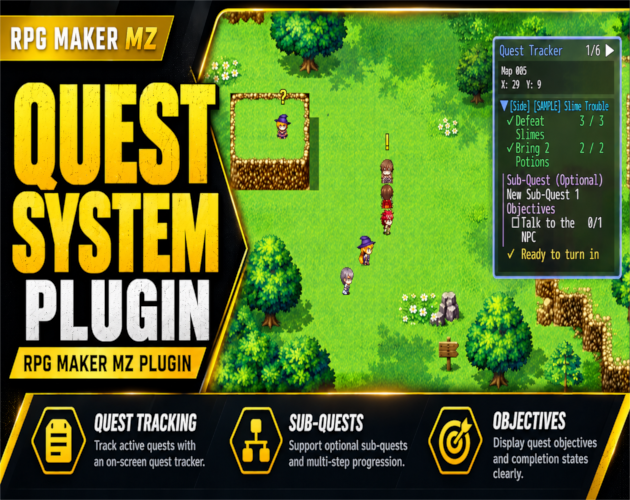
The plugin includes a full-screen visual quest editor opened with F7 during playtesting, an in-game quest journal, and a live objective tracker. It suits story-driven JRPGs, fantasy adventures, and RPG projects that need multiple connected quests.
What can you build with CT Quest System?
- Main and side quests: Organize story progression and optional adventures.
- Parent quests with sub-quests: Add up to five sub-quests per parent quest; mark each one required or optional.
- Objective tracking: Configure multiple quest objectives and completion requirements, then show progress to players.
- NPC interactions: Use RPG Maker MZ events to let NPCs offer quests and accept turn-ins.
- Prerequisites and quest chains: Control when quests become available and how quests progress.
- Rewards: Set rewards for completing quests and sub-quests.
- Quest journal and live tracker: Help players review active quests, objectives, progress, and turn-in status.
- Save integration: Keep quest progress in the game's save data.
Built-in visual quest editor
Create, edit, and organize quests in a full-screen editor accessible during RPG Maker MZ playtesting. Set objectives, requirements, progression, and rewards in one visual workflow. The editor is included with CT Quest System; you do not need a separate quest-editor plugin.
RPG Maker MZ quest journal and tracking
Players can use the quest journal to review their quests, while the on-screen tracker shows active objectives during gameplay. Quest givers and turn-ins can be connected to RPG Maker events through the plugin's commands.
Quick start: How to use CT Quest System
- Extract the downloaded plugin package into your RPG Maker MZ project according to the included documentation.
- Enable [4]CT_QuestSystem in RPG Maker MZ's Plugin Manager.
- Start a playtest and press F7 to open the Quest System Editor.
- Create a main quest or side quest; set its objectives, requirements, and completion rewards.
- Add optional or required sub-quests where needed (up to five per parent quest).
- Use RPG Maker MZ events and plugin commands to set up quest acceptance, progress, and turn-ins.
- Playtest the quest journal, tracker, and save/load behavior.
Frequently asked questions
Does CT Quest System work with RPG Maker MZ?
Yes. CT Quest System is developed for RPG Maker MZ. Compatibility with RPG Maker MV or other engines is not claimed.
Can I create main quests and side quests?
Yes. It supports main quests, side quests, and parent quests with up to five required or optional sub-quests.
Is there a visual quest editor?
Yes. Press F7 during a playtest to open the full-screen editor.
Can NPCs give out and receive quests?
Yes. Configure quest givers and turn-ins using RPG Maker MZ events and plugin commands.
Does the plugin include a quest journal and tracker?
Yes. The journal displays quest information, and the live tracker displays active objectives and progress during gameplay.
Does quest progress save?
Yes. Quest progress is stored with the game's save data.
Who is it for?
RPG Maker MZ creators developing JRPGs, narrative adventures, exploration games, and projects with NPC quests or multi-stage questlines. The plugin is especially useful if you want quest progression, objectives, and rewards organized in one system rather than maintained only through manual event logic.
Download / purchase CT Quest System
Official Cynthia Tools product page: https://cynthiatools.com/plugins/rpg-maker-mz-plugin-ct-quest-system
itch.io download and purchase ($6.90 USD listed in the exported product data): https://cynthiatool.itch.io/rpg-maker-mz-plugin-ct-quest-system
Video demonstration: https://www.youtube.com/watch?v=NHhzipkFqWI
Other Cynthia Tools plugins
- CT Picture Event Binder — clickable picture buttons and RPG Maker event triggers: https://cynthiatool.itch.io/cynthia-tools-picture-event-binderrpg-maker-mz-plugin
- CT Farming System — crops, growing, and harvesting gameplay: https://cynthiatool.itch.io/cynthia-tools-farming-systemrpgmaker-mz-plugin
- CT Elemental Reaction System — elemental combinations and reaction damage: https://cynthiatool.itch.io/cynthia-tools-elemental-reaction-systemrpgmaker-mz-plugin
Included in the listed package: CT Quest System plugin, visual quest editor, quest data file, installation and usage documentation, and troubleshooting guide.
Built with AI assistance. Shaped, tested, and supported by a real maker.
 Utility