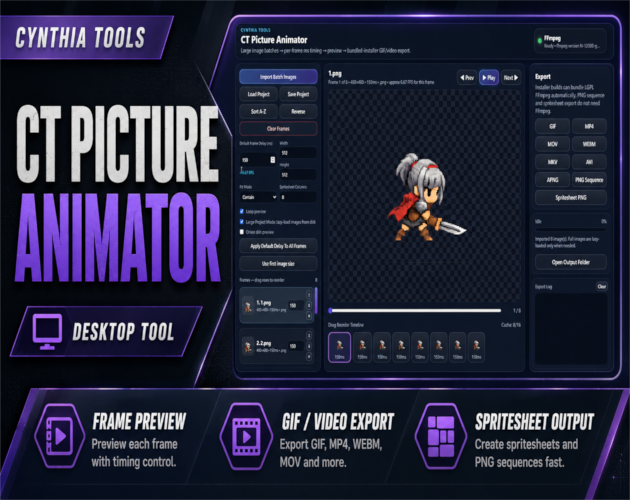
CT Picture Animator is a Windows desktop image-frame animator that turns still image frames into GIFs, videos, APNGs, PNG sequences, and spritesheet PNGs. It is built for game developers, pixel artists, RPG Maker MZ creators, UI artists, and other creators who want a fast frame-based animation workflow without opening a large editing suite.
Although CT Picture Animator is not an RPG Maker MZ plugin, it fits naturally into RPG Maker MZ and general game-development asset workflows: import sprite, effect, UI, or other image frames, put them in the correct order, adjust timing, preview the motion, then export the result in a format that suits your project.
Import Image Frames
Load PNG, JPG, JPEG, WEBP, BMP, or GIF images into one animation project. This makes it easy to turn a folder of rendered frames, pixel-art poses, UI states, or effect images into a playable animation sequence.
Control Frame Timing
Set a default frame delay for the project, then fine-tune individual frame timing when certain poses need to appear faster or stay on screen longer.
Preview Before You Export
Use the built-in live preview to check your animation inside the app. Loop preview helps you test repeating motion, while onion skin preview makes it easier to compare movement between frames.
Reorder Frames on the Timeline
Drag frames into the order you want and quickly test the new sequence. The timeline keeps the frame-based workflow simple and easy to read.
Export to Multiple Formats
CT Picture Animator can export your animation as:
- GIF
- MP4
- MOV
- WEBM
- MKV
- AVI
- APNG
- PNG Sequence
- Spritesheet PNG
Use GIF or video for previews and social posts, APNG for animated PNG workflows, PNG sequences for frame-by-frame pipelines, or spritesheet PNG output for game and UI animation assets.
Spritesheet Export for Game Assets
Combine imported image frames into a spritesheet PNG for game-development workflows. This is useful for sprite animation, pixel art, visual effects, UI animation, and other projects that need multiple frames packed into one image.
Large Project Mode
For bigger batches, CT Picture Animator can lazy-load images from disk instead of forcing every image into memory at once.
Good For
- Game developers and indie creators
- RPG Maker MZ asset preparation
- Pixel-art and sprite animation previews
- UI animation testing
- GIF and APNG creation
- Video export from image frames
- PNG sequence export
- Spritesheet creation
- Social-media animation assets
- Simple frame-based animation workflows
Simple, Practical Workflow
Import your frames, arrange them, adjust timing, preview the animation, and export. CT Picture Animator focuses on the specific job of turning still images into usable animation files without the overhead of a full animation or video-production suite.
As useful as a hammer, as simple as a hammer — straightforward, intuitive, and instantly usable.
 Tools
Tools