tutorial · 2026-11-19
How to Create a Tank, Aggro & Taunt System in RPG Maker MZ
Build MMO-style tank, aggro and taunt mechanics in RPG Maker MZ with CT Threat System. Follow skill notetag examples, boss immunity setup and battle testing.
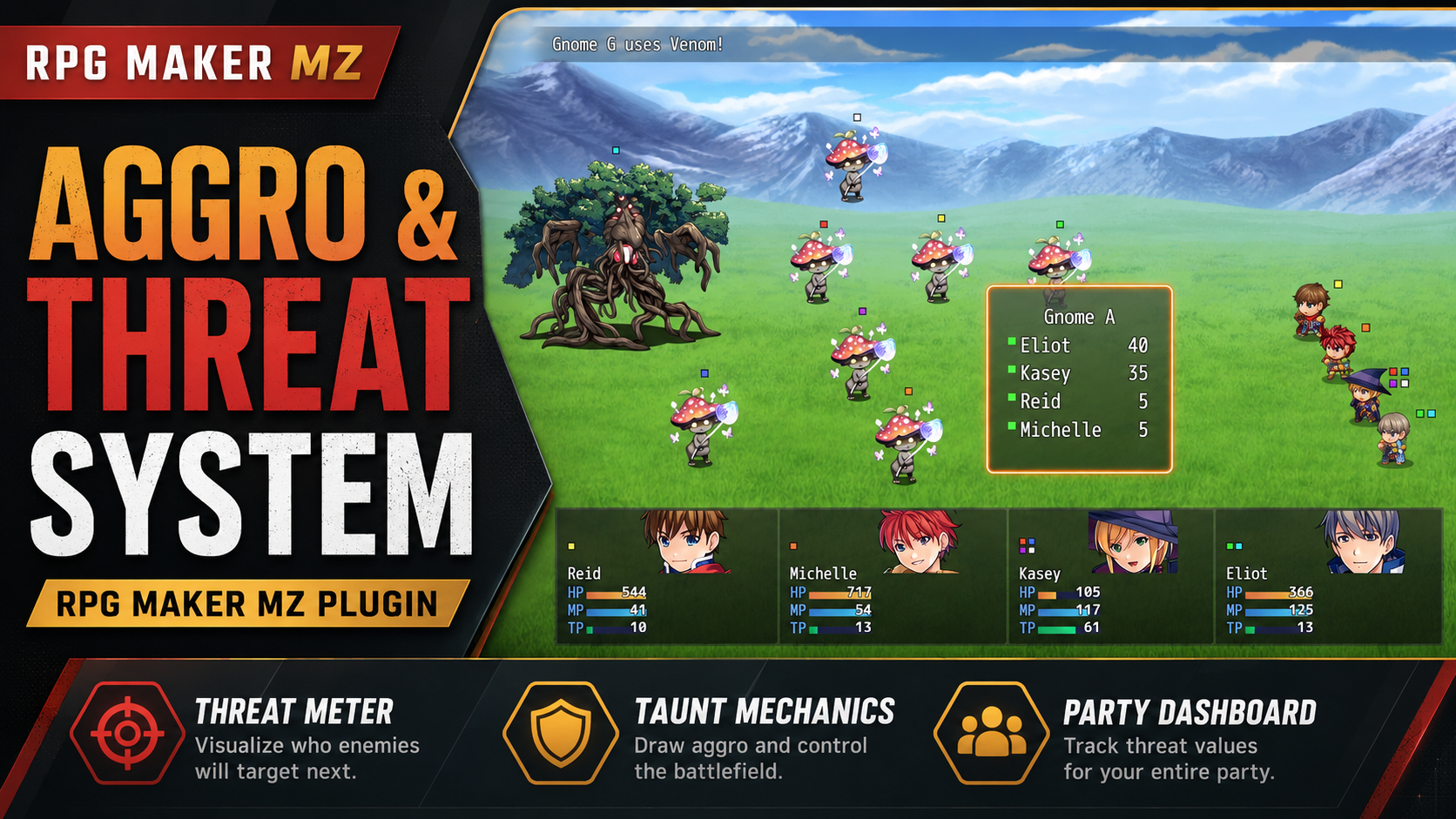
# How to Create a Tank, Aggro & Taunt System in RPG Maker MZ
CT Aggro & Threat System v4.2.2 is an RPG Maker MZ plugin for creating MMO-style tank, threat and taunt mechanics. It lets each enemy track threat for individual party members so enemy targeting can respond to a tank's skills, damage-dealer actions and healing abilities instead of relying only on ordinary targeting.
This practical RPG Maker MZ aggro system tutorial walks through setting up a Knight (tank), Warrior (DPS) and Priest (healer), configuring threat with skill notetags, creating single-target and area taunts, and inspecting threat values during battles. You can follow the setup through RPG Maker MZ's Plugin Manager and Database without writing JavaScript.
Quick Answer: How Do You Add an Aggro and Taunt System to RPG Maker MZ?
- Install and enable CT Aggro & Threat System in RPG Maker MZ's Plugin Manager.
- Set Base Threat (the default is `5`) to establish a baseline for actor skill use.
- Add `<ThreatPts:50>` to a tank's skill to generate additional threat.
- Add `<Taunt>` to a single-target skill or `<TauntAll>` to a party-protection skill that affects all living enemies.
- Add `<ImmuneTaunt>` to an enemy's Note box if that enemy should ignore both taunt modes.
- Test with the plugin's threat indicators and live enemy Threat Inspector.
These settings let you build tank-focused combat without scripting a separate enemy-threat system. Follow the detailed examples below to see how threat values behave.
1. Understanding Threat and Aggro
Before configuring anything, it's useful to understand how the system works.
In an MMO-style threat system, every enemy maintains its own threat values for the party members.
For example:
| Party Member | Threat |
|---|---:|
| Knight (Tank) | 100 |
| Warrior (DPS) | 65 |
| Priest (Healer) | 30 |
In this example, the enemy prioritizes the Knight because the Knight has the highest threat value.
If the Warrior increases their threat to 120, they can take aggro away from the Knight.
The Knight can then use a taunt skill to reclaim the enemy's attention.
How CT Threat System Handles Aggro
The plugin uses several important rules. In v4.2.2, the configured base threat and `<ThreatPts:X>` skill notetag determine the explicit threat adjustment; the source code does not add a separate automatic damage- or healing-amount multiplier.
- Each enemy tracks threat separately for each actor.
- Enemies prioritize the highest-threat living actor.
- Skills generate a configurable base amount of threat.
- Skills can modify threat using notetags.
- Taunt skills force enemy targeting temporarily.
- Threat does not automatically decay during battle.
- Threat values are reset for newly initialized enemies.
This creates more predictable combat where players can actively manage enemy attention.
2. Install CT Aggro & Threat System
First, download CT Aggro & Threat System from Cynthia Tools.
Plugin download:
https://cynthiatools.com/plugins/4-ct-threatsystem-mmo-style-threat-taunt-system-rpg-maker-mz
Extract the downloaded ZIP package.
Locate:
`[4]CT_ThreatSystem.js`
Copy this file into your RPG Maker MZ project's:
`js/plugins/`
Next:
- Open your project in RPG Maker MZ.
- Navigate to Tools → Plugin Manager.
- Add `[4]CT_ThreatSystem`.
- Set its status to ON.
- Click OK to save.
The plugin doesn't require another Cynthia Tools plugin to handle its core threat calculations.
However, compatibility testing is recommended when combining it with other battle systems that modify enemy targeting.
3. Configure Base Threat
Open the CT Threat System settings in Plugin Manager.
Find:
Base Threat (per skill use)
The default value is:
`5`
This means an actor's skill use generates 5 base threat points under the plugin's threat-processing rules.
For example, a skill targeting one enemy normally generates its base threat on that enemy.
Actions targeting an actor can apply base threat across the living enemy troop.
Base threat is generated when the action is applied, even if the skill misses.
For our tutorial, leave Base Threat at 5.
We'll use skill notetags to give different abilities their own threat behavior.
4. Create Your Tank Character
Let's imagine our RPG party contains three characters:
Knight — Tank
A defensive fighter responsible for attracting enemy attacks.
Warrior — DPS
A damage dealer who focuses on defeating enemies quickly.
Priest — Healer
A support character responsible for restoring party health.
The goal is to make the Knight the primary enemy target while allowing the Warrior and Priest to generate their own threat through abilities.
Next, we'll give the Knight a skill specifically designed to generate additional threat.
5. Create a High-Threat Skill
Open:
Database → Skills
Create a new skill called:
Shield Strike
For this example:
- Skill Name: Shield Strike
- Scope: 1 Enemy
- Damage: Physical damage
- Intended User: Knight
In the skill's Note box, enter:
`<ThreatPts:50>`
This tells CT Threat System to add 50 additional threat points when the skill is processed.
Because our Base Threat is set to 5, the action contributes:
5 Base Threat + 50 Additional Threat = 55 Threat
This is useful for designing abilities that generate more enemy attention than ordinary attacks.
Controlling Threat with Notetags
You can experiment with different values:
| Notetag | Purpose |
|---|---|
| `<ThreatPts:10>` | Small additional threat |
| `<ThreatPts:50>` | High additional threat |
| `<ThreatPts:100>` | Very high additional threat |
| `<ThreatPts:-30>` | Reduce threat |
Negative threat values are supported.
Threat cannot fall below zero.
Tip: The `<ThreatPts:X>` value applies once per skill use in the normal action-processing flow, rather than once for every hit of a multi-hit skill.
6. Create a Single-Target Taunt Skill
Now let's give our Knight the ability to force an enemy to attack them.
Create another skill in Database → Skills.
Skill Name: Provoke
Recommended example setup:
- Scope: 1 Enemy
- Damage Type: None
- Intended User: Knight
In the Note box, enter:
`<Taunt>`
That's it!
When Provoke is applied to an enemy, CT Threat System will:
- Force that enemy to target the Knight temporarily.
- Increase the Knight's threat to at least one point above the highest other actor's threat on that enemy.
- Maintain the forced-target effect for one enemy turn.
Example Battle Situation
Imagine the current threat values are:
| Actor | Before Taunt | After Taunt |
|---|---:|---:|
| Knight | 40 | At least 121 |
| Warrior | 120 | 120 |
| Priest | 30 | 30 |
After the Knight successfully uses Provoke, the Knight becomes the highest-threat actor.
The enemy's forced-target effect lasts one enemy turn.
Important: Although the forced-target effect expires, the threat gained from taunting remains. The enemy may therefore continue targeting the Knight afterward if the Knight still has the highest threat.
This behavior allows tanks to maintain enemy attention through threat management rather than depending entirely on repeated taunts.
7. Create an Area Taunt Skill
What if your Knight needs to attract the attention of several enemies at once?
CT Threat System also supports an area taunt.
Create another skill:
Skill Name: Battle Cry
You can configure it as a non-damaging skill and assign it to your Knight.
In the Note box, enter:
`<TauntAll>`
Unlike the normal `<Taunt>` tag, `<TauntAll>` applies the taunt effect to all living enemies in the troop, regardless of the skill's targeting scope.
Each affected enemy will:
- Temporarily target the Knight.
- Raise the Knight's threat above the highest other actor's current threat for that enemy.
This is particularly useful for battles involving multiple enemies.
Example
Your party encounters four monsters.
The Knight uses Battle Cry.
All four enemies that are vulnerable to taunt are affected.
This creates an MMO-style area taunt where your tank can regain battlefield control.
8. Create a Threat Reduction Skill
Tanks aren't the only characters who benefit from threat management.
Sometimes a DPS character generates too much threat and needs a way to lower it.
Let's create a skill called:
Low Profile
Example setup:
- Scope: The User
- Damage Type: None
- Intended User: Warrior
Add this notetag:
`<ThreatPts:-30>`
This skill reduces the user's threat through the plugin's threat adjustment system.
With our Base Threat of 5, the net adjustment for this example is -25 threat on each affected enemy.
The result is clamped at zero.
This type of ability can add another layer of strategy to party combat.
A powerful Warrior may deal heavy damage, but players can choose when to use a threat reduction ability to help the tank maintain aggro.
9. Give Healing Skills Their Own Threat Values
Support characters can also participate in the threat system.
For example, create a healing skill called:
Greater Heal
Configure it as a normal healing skill targeting an ally.
Add:
`<ThreatPts:25>`
With Base Threat set to 5, this example contributes 30 threat to each living enemy because the skill targets an actor.
This creates a useful tactical consideration: healing the party can also increase the healer's enemy attention.
Developers can assign different threat values to different healing abilities to balance risk and reward.
A minor heal might generate relatively little threat, while a powerful healing spell could generate considerably more.
10. Create a Boss Immune to Taunt
Some bosses shouldn't be easily controlled by taunt abilities.
For example, imagine a powerful dragon that ignores your Knight's attempts to force its attention.
Open:
Database → Enemies
Select your boss enemy.
In the enemy's Note box, add:
`<ImmuneTaunt>`
This makes the enemy immune to both:
- `<Taunt>`
- `<TauntAll>`
The enemy can still accumulate threat normally.
However, those taunt effects will not force the boss to target the caster or perform the usual taunt threat adjustment.
Why Use Taunt Immunity?
Taunt immunity can be useful for:
- Powerful boss encounters.
- Special enemy mechanics.
- Enemies that require alternative strategies.
- Encounters designed around threat generation rather than forced targeting.
It gives developers another option for balancing difficult battles.
11. Monitor Threat During Battle
CT Threat System includes visual tools to help players and developers understand enemy targeting.
Threat Indicators
Colored indicators can appear near actors and enemies.
These help communicate which enemies are targeting particular party members.
You can configure several settings in Plugin Manager:
- Indicator Shape: Box or Circle
- Indicator Size: XS, S, M, L, XL
- Indicator Frame Color
- Actor Indicator Position
- Enemy Indicator Position
- Indicator Spacing
- Show or Hide Actor Indicators
- Show or Hide Enemy Indicators
Live Threat Inspector
During battle, move your mouse over an enemy.
The Threat Inspector displays the enemy's current threat values for party members.
This is especially useful when balancing your tank, DPS, and healer abilities.
You can observe how threat values change after different actions and whether the intended actor becomes the enemy's target.
12. Front View and Side View Support
CT Threat System supports RPG Maker MZ's Front View and Side View battle presentation.
The plugin includes an Enemy Icon Render Mode setting.
Available options:
- Auto
- SideView
- FrontView
For most standard RPG Maker MZ projects, Auto is the appropriate starting choice.
If you're using a custom battle system and the threat indicators are positioned incorrectly, try selecting the appropriate render mode manually.
You can also adjust the indicator position and spacing to suit your project's battle layout.
Recommended Companion Plugin
For projects using custom battle resolutions, Cynthia Tools also offers:
CT Battle Resolution Fix — FREE RPG Maker MZ Plugin
This companion plugin improves side-view battler positioning and can help with threat indicator alignment at different screen resolutions.
Download:
https://cynthiatool.itch.io/ct-battle-resolution-fix-side-view-actor-positioning-mz
13. Test Your Tank and Aggro System
Now that we've configured our abilities, let's test everything.
Create a test battle with your Knight, Warrior, and Priest.
Add two or three normal enemies.
Try the following sequence:
- Use Shield Strike with the Knight to generate high threat.
- Use ordinary skills with your Warrior.
- Hover over enemies to inspect threat values.
- Let the Warrior generate more threat than the Knight.
- Use Provoke to reclaim a single enemy's attention.
- Use Battle Cry to taunt multiple enemies.
- Use Low Profile to reduce the Warrior's threat.
- Test a boss with `<ImmuneTaunt>`.
Watch the enemy targeting behavior during each step.
This helps you understand how the system works before implementing it in your full game.
Common Problems and Solutions
Why Is My Taunt Not Working?
Check that the correct notetag is in the skill's Note box:
`<Taunt>`
Make sure the skill is applied to an enemy and that the target does not have `<ImmuneTaunt>`.
Also check whether another battle plugin is overriding enemy targeting.
Why Doesn't Taunt Affect Every Enemy?
The normal `<Taunt>` tag only affects the enemy receiving the skill.
For a troop-wide taunt, use:
`<TauntAll>`
Why Does Threat Remain High After Several Turns?
CT Threat System does not automatically decay threat values.
Threat remains until additional threat is generated, threat is reduced, or the battle's enemy threat data is reinitialized.
Why Doesn't My Threat Value Change?
Make sure you're using the correct skill notetag format.
For example:
`<ThreatPts:50>`
The value must be a whole number, although negative values are supported.
Also confirm that the actor is using the skill in battle.
Why Aren't the Threat Indicators Visible?
Check the following Plugin Manager settings:
- Show Actor Threat Icons
- Show Enemy Threat Icons
- Enemy Icon Render Mode
- Indicator Position and Spacing
If another plugin modifies the battle interface, additional compatibility testing may be required.
Frequently Asked Questions
Can I create a tank system in RPG Maker MZ without coding?
Yes. CT Aggro & Threat System provides threat tracking and taunt mechanics that can be configured using skill and enemy notetags.
Can different enemies have different threat targets?
Yes. Each enemy maintains its own threat values for each actor.
Can I create an area taunt?
Yes. Add `<TauntAll>` to a skill to affect all living enemies that are not immune to taunt.
Can I lower an actor's threat?
Yes. Use a negative `<ThreatPts:X>` value on a skill.
Does the plugin support boss taunt immunity?
Yes. Add `<ImmuneTaunt>` to the Enemy database entry.
Does threat automatically decrease over time?
No. This version uses a no-decay threat system.
Does CT Threat System automatically scale threat with damage or healing amount?
In v4.2.2, the plugin's threat-processing code applies the configured Base Threat and any explicit `<ThreatPts:X>` adjustment. It does not calculate an extra threat multiplier from the numerical damage or healing amount. Give high-damage and healing skills their own `<ThreatPts:X>` values when you want them to generate more threat.
Does taunt always permanently lock an enemy onto the tank?
No. The forced-target effect lasts one enemy turn. The taunter's raised threat value remains afterward, so the enemy can continue preferring that actor as long as they still have the highest threat.
Final Thoughts
A tank and aggro system makes enemy-targeting decisions part of RPG Maker MZ combat strategy. Players can use a high-threat attack to attract enemies, a targeted or troop-wide taunt to protect allies, and negative threat notetags to help a DPS character shed attention.
With CT Aggro & Threat System for RPG Maker MZ, developers can introduce threat-based targeting, customizable aggro skills, single-target taunts, area taunts, and taunt-immune enemies without writing their own JavaScript battle system.
Whether you're creating an MMO-inspired RPG, a traditional party-based adventure, or a tactical boss encounter, the plugin provides tools for more deliberate enemy targeting.
Get CT Aggro & Threat System
Ready to create your own tank and aggro mechanics?
Get CT Aggro & Threat System for RPG Maker MZ
More RPG Maker MZ plugins and development tools:
https://cynthiatools.com/
Cynthia Tools — Useful tools. More time to create.
Explore the tools
RPG Maker MZ battle plugin. CT Aggro & Threat System adds a threat/aggro layer that influences enemy target selection a…
RPG Maker MZ Plugin: CT Aggro & Threat System – Tank, Taunt & Enemy Targeting
Add MMO-style threat, aggro, tanking, taunts, and enemy target control to RPG Maker MZ. Build clearer Tank / Healer / DPS roles with configurable threat behavior and battle targeting.